Jetto
ChangelogAbout
Tally
PlansFeaturesReleases

Tallyby Jetto

MIT open sourcemacOS 14 or laterFree

Every Claude and Codex account you pay for, at a glance.

Your 5-hour, weekly and flagship-model quota, side by side for every account. New sessions start on the account with the most room.

Download for macOSView source on GitHub

Tally Pro plans ↓

Free download · macOS 14 or later · Requires a signed-in Claude Code or Codex CLI

Tally is a macOS app. Open this page on your Mac to download.

Tally Pro

Your machines, one pool

Send a command to the pool and Tally runs it on a Mac with room: tally run --on auto -- <command>. Output and exit code stream back to your terminal.

TallyPRO/Compute poolCompute pool · 86/100
100 machines · 86 running2 offline
mini-23
CPUGPUMEM

Three bars, always in this order. Length is load.

RunningJust activeIdleOfflineAbove 65%Red: above 80%Selected
RACK ACPU 1 · GPU 0
RACK BCPU 1 · GPU 2
RACK CCPU 1 · GPU 0
RACK DCPU 2 · GPU 2
53%
Pool CPU
30%
Pool GPU
CPU over 80%
5
GPU over 80%
4
Pool CPU, last 60 s53%
Jobs today
2068
mini-23
Running · xcodebuild test · 2m 21s
10-core · 32 GB · M4
62%
CPU
1h peak 70%
9%
GPU
1h peak 26%
62%
Memory
158
Disk free
GB
CPU, last 60 s
Jobs 1Today 10
Your Mac$ tally run --on auto -- pnpm test
mini-12  PASS  auth.test.ts  2m ago
studio-04  PASS  build  5m ago
Illustration: a pool of 100 machines.

How it reads your quota

Through the official CLIs
Claude quota is read with the official claude -p "/usage", and Codex with the official codex app-server. Sign-in is handled by the official tools themselves.
Only your own accounts
Multiple accounts means subscriptions you pay for yourself, on your own Mac. Tally does not proxy, share or resell any account.
Your data stays on your Mac
There is no telemetry and no Tally server. Error reporting is off by default and is sent only if you turn it on in Settings.

Requirements

  • macOS 14 or later
  • At least one signed-in Claude Code or Codex CLI account
  • Available in English, Traditional Chinese, Simplified Chinese, Japanese and Korean

FAQ

What is Tally?
Tally is an open-source macOS menu bar app by Jetto. It shows the remaining quota of all your Claude and Codex accounts at once, and picks the account with the most room when you start a new session.
How can I see the quota of several Claude or Codex accounts at once?
After you install Tally, every signed-in Claude Code config folder and every Codex install gets its own card, with 5-hour, weekly and top-model quota side by side. The menu bar also shows the combined total.
Is Tally open source? Does it cost anything?
Tally is open source under the MIT license. The source code is on GitHub, and it is free to download and use. The compute pool has a machine limit per plan: the Free plan lets you add 1 machine besides your main Mac, and adding more takes Pro or Pro Max. See Plans on this page for prices.
Does Tally read my sign-in credentials?
Quota is read through the official Claude Code and Codex CLIs, and sign-in is handled by the official tools. The one exception is the expiry date of your Claude sign-in: Tally briefly reads the local sign-in data and takes out only the date. It does not log, store or send any credentials.
What do I need to use Tally?
macOS 14 or later, and at least one signed-in Claude Code or Codex CLI account.
Demo data542%58%P56%45%T53%38%9:41
TallyUsageCostSessionsrefreshes in 56s

Account Pool

Claude ×5add 1 account
58%
Weekly pool · runs dry in about 4d 10hnext refill Claude 3 in 19h 11m
Codex ×4Team short at this pace

Pro ×3

45%
Weekly pool · won't run dry at this pace ✓next refill Codex 3 in 1d 16h

Team ×1

38%
Weekly pool · runs dry in about 1d 18hnext refill Codex 4 in 4d 19h
5hWeeklyFlagship
ClaudeMax 20x
97%
0%
92%
Claude 2Max 20x
48%
75%
61%
Claude 3Max 20x
12%
34%
18%
Claude 4Max 20x
73%
88%
80%
Claude 5Max 20x
55%
11%
41%
CodexPro3
31%
58%
Codex 2Pro1
86%
29%
Codex 3Pro0
17%
82%
Codex 4Team2
38%
53%
UsedLeftby Jetto

Tally account panel (demo data): the Claude and Codex account pools and how long they last at the current pace on top, and nine rows below, one per account, with its 5-hour, weekly and flagship-model quota.

Demo data: five Claude Max and four Codex accounts. The Tally menu bar item above, the open account panel below.

Features

One card per account

Each Claude and Codex account gets its own card, with 5-hour, weekly and top-model quota and their reset times side by side.

5hWeeklyFlagship
Claude 2Max 20x
48%
75%
61%
Claude 3Max 20x
12%
34%
18%
Claude 5Max 20x
55%
11%
41%
Codex 2Pro1
86%
29%

Close-up of the Tally account panel (sample data): four accounts, one row each, with 5-hour, weekly and flagship-model quota side by side, plus warning and refill markers.

Sample data

One combined gauge

Accounts from the same provider are combined into one total, and Tally estimates how long it will last at your recent pace.

TallyUsageCostSessionsrefreshes in 56s

Account Pool

Claude ×5add 1 account
58%
Weekly pool · runs dry in about 4d 10hnext refill Claude 3 in 19h 11m
Codex ×4Team short at this pace

Pro ×3

45%
Weekly pool · won't run dry at this pace ✓next refill Codex 3 in 1d 16h

Team ×1

38%
Weekly pool · runs dry in about 1d 18hnext refill Codex 4 in 4d 19h

Close-up of the Tally account pool (sample data): Claude and Codex each merged into one weekly quota, showing how long it lasts at the current pace and which account refills next.

Sample data

Picks the account for new sessions

When you start a session with tally claude, Tally compares each account's remaining quota and reset time, and picks the one with the most room.

$ tally claude

[tally] → Claude 4 (weekly 88% · resets 2d)

$ tally codex

[tally] → Codex 3 (weekly 82% · resets 4d)

Terminal output (sample data): after running tally claude and tally codex, Tally prints one line each saying which account it picked, with that account's weekly quota left and reset time.

Terminal output. Accounts and numbers are samples.

Hands off when you hit a limit

When a session hits its usage limit, Tally continues the same conversation on the next account that still has quota.

$ tally claude

[tally] → Claude 2 (weekly 75% · resets 3d)

⋮

[tally] cap hit → handing off to Claude 4 (weekly 88% · resets 2d)

Terminal output (sample data): when a conversation hits its usage cap, Tally prints a cap hit line and continues the same conversation on the next account.

Terminal output. Accounts and numbers are samples.

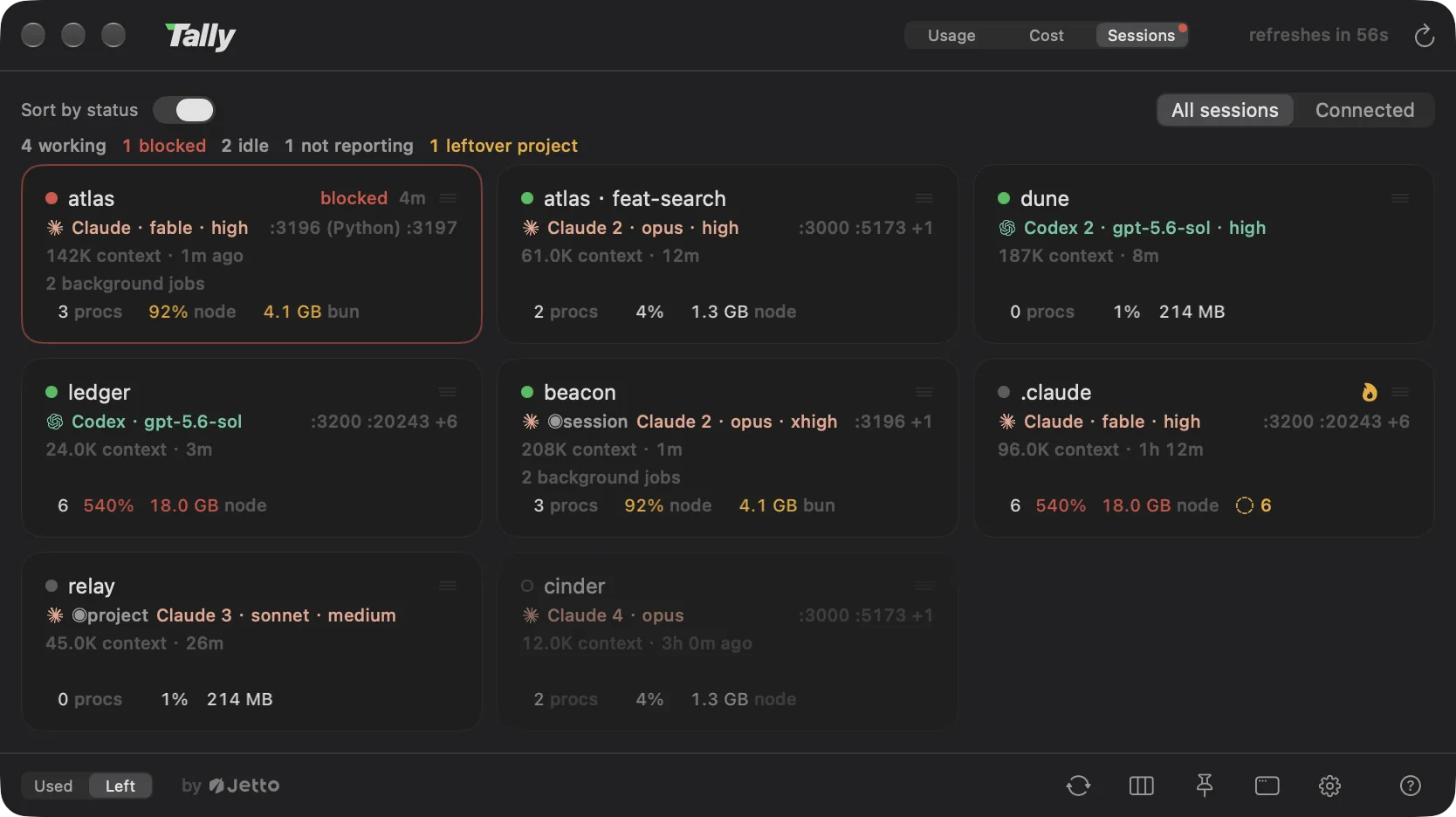
Every session on one board

Each session Tally starts gets its own card, so you can see which one is waiting for your reply and how much CPU and memory it uses.

Screenshot of the Tally sessions board: one card per conversation, showing its account, model, whether it is waiting for you, and CPU and memory use.
App screenshot

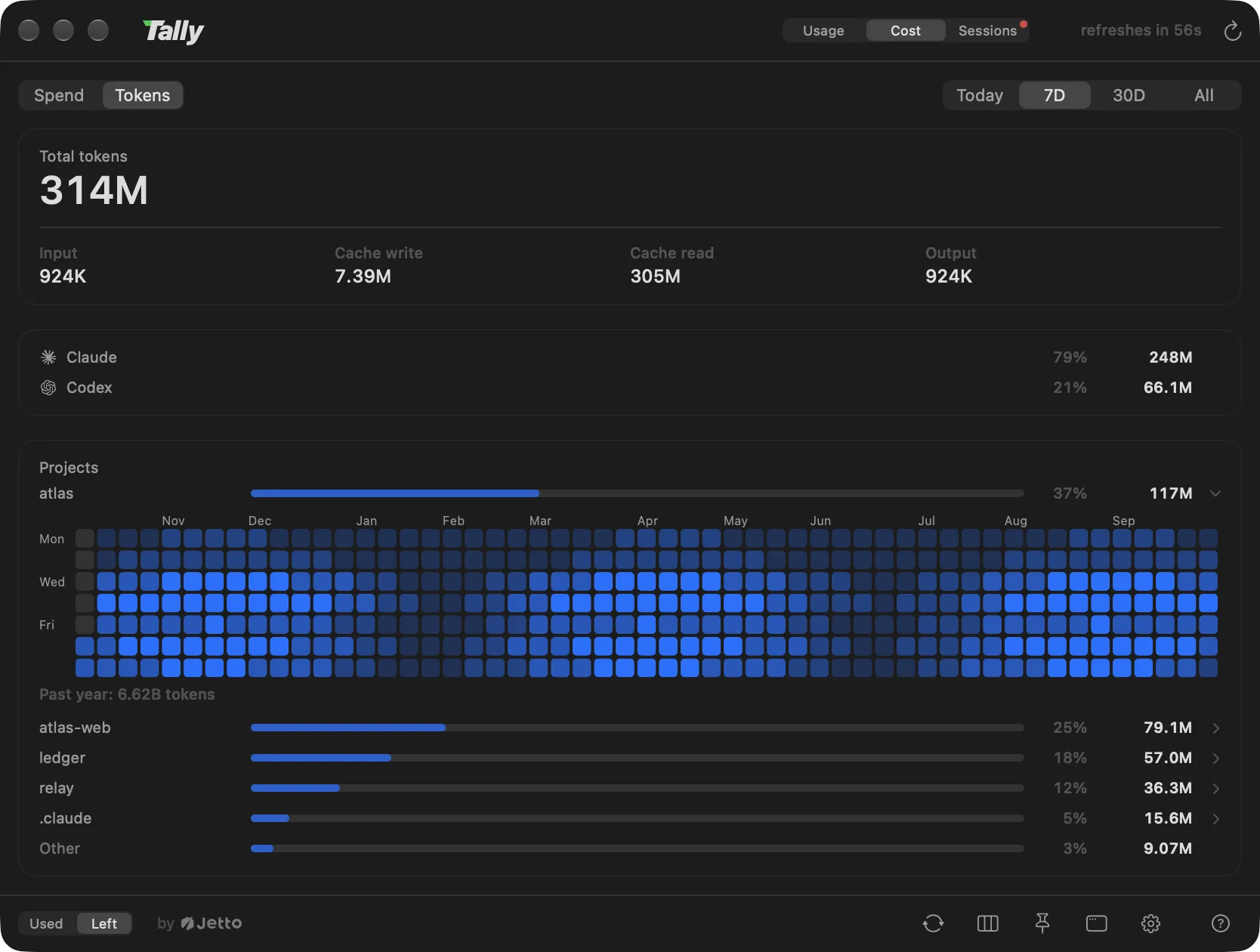
Token usage by project

Token usage for today, 7 days, 30 days or all time, broken down by project, with a year-long daily activity heatmap.

Screenshot of Tally token usage: the total, each project's share, and a year-long daily activity heatmap.
App screenshot

See what every account has left.

Tally is free and open source. Once installed, the menu bar shows each account's remaining quota.

Download for macOSView source on GitHub

Free download · macOS 14 or later · Requires a signed-in Claude Code or Codex CLI

Plans

Unlimited accounts. Pick compute by machines in your pool.

Yearly billing costs the same as 10 months.

Open source

$0
No account limitClaude and Codex accounts side by side

For people who run several AI subscription accounts.

  • New session: picks the account whose quota lasts longest
  • Hit a quota limit: the same conversation continues on the next account
  • Moves off a nearly empty account first: checked when idle, on /clear and after each turn
  • Opens the next window early and spends reset credits on Claude accounts; once you mark a browser account, keeps a reserve on it
  • Menu bar and session board show every account and AI session at a glance
  • MIT license; reads usage only through the official CLIs
View on GitHub

Free

$0
1 machinePool machines besides your main Mac

Everything in open source, plus your first pool machine.

  • Everything in open source, same unlimited accounts
  • Send a command to the pool and Tally runs it on a machine with room; output and exit code stream back to your terminal
  • When this Mac is overloaded, heavy jobs Claude Code wants to run are intercepted, with a command attached to send them to idle pool machines
  • Pool machines stay awake while a job runs; to keep a MacBook awake with its lid closed, set it up once first (one password entry)
Download for macOS

Pro

Recommended
$12/mo
Up to 5 machinesPool machines besides your main Mac

For several machines running jobs together.

  • Unlimited accounts, switching automatically on a new session, a quota limit, or a nearly empty account
  • Send a command to the pool and Tally runs it on a machine with room; output and exit code stream back to your terminal
  • Compute switches automatically: with no machine named, it picks by free cores, memory, tools and GPU
  • When this Mac is overloaded, heavy jobs Claude Code wants to run are intercepted, with a command attached to send them to idle pool machines
  • Pool machines stay awake while a job runs; to keep a MacBook awake with its lid closed, set it up once first (one password entry)
  • The panel shows each machine's load, recent jobs and resource peaks
Subscribe to Pro

Pro Max

$24/mo
Unlimited machinesPool machines besides your main Mac

For a rack of machines running jobs together.

  • Everything in Pro
  • Unlimited accounts, with the same automatic account and compute switching as Pro
  • Send a command to the pool and Tally runs it on a machine with room; output and exit code stream back to your terminal
  • No cap on the number of pool machines
Subscribe to Pro Max

Machine counts exclude the main Mac you run Tally on. If your pool already has more machines than your plan allows, those machines stay and keep working; you just can't add new ones, and re-adding a machine already in the pool is still allowed. Prices in USD; tax is calculated at checkout.

Jetto

Work that just works.

Resources

  • Changelog

Contact

  • About
  • hello@jetto.ai

Community

  • GitHub

Legal

  • Terms of Service
  • Privacy Policy

© 2026 Jetto AI LLC